

User Journey Mapping: Definition, Examples, and Templates
Learn what user journey mapping is, see real user journey map examples, and get a simple user journey template to map your own product experience.


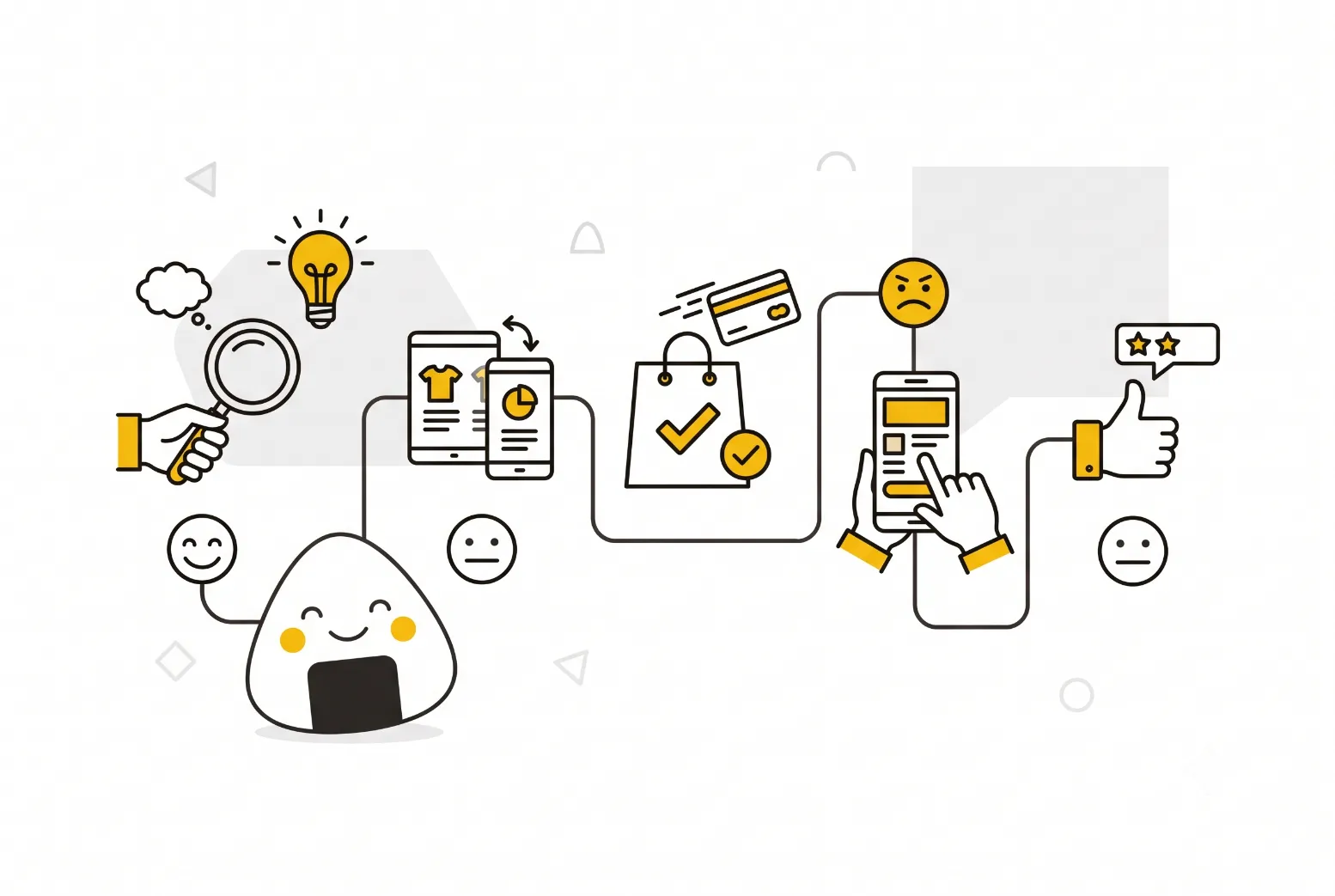
Table of Contents
Audio
User journey mapping is the process of visualizing every step a person takes to reach a goal with your product, from the first search to the moment they get what they came for. It turns scattered assumptions about how people use your product into one evidence based picture your whole team can act on.
For product managers, that picture matters because most product decisions touch more than one team. A shared user journey map gives designers, engineers, marketers, and support staff a single reference point, so nobody optimizes their own step at the expense of the bigger picture. Without it, teams tend to fix what they can see in their own dashboards and miss the friction happening one step upstream or downstream.
This guide explains what a user journey map actually is, walks through real user journey map examples, and gives you a user journey template you can adapt for your own product. You will also find quick answers to the questions product teams ask most often, including how a user journey map differs from a customer journey map.
What Is a User Journey Map?
A user journey map is a visual timeline of the steps, actions, thoughts, and emotions a specific user goes through while trying to accomplish a goal with your product. Unlike a simple user flow diagram, which only shows the screens or steps someone clicks through, a journey map layers in what the user is thinking and feeling at each stage, and where the experience meets or misses their expectations.
Most user journey maps share five core building blocks, a structure popularized by Nielsen Norman Group's journey mapping research:
- Actor: the specific persona or user segment the map represents. One map, one persona, one scenario, is the rule that keeps a map useful instead of vague.
- Scenario and goal: the situation the user is in and what they are trying to achieve.
- Journey phases: the high level stages the user moves through, such as discovery, onboarding, first use, and ongoing use.
- Actions, thoughts, and emotions: what the user does at each phase, what they are thinking, and how they feel, often plotted as a rising and falling emotional line.
- Opportunities: the specific product, design, or process changes the map points toward.
It helps to be precise about what a user journey map is not. It is not a user persona on its own, though it depends on one. A persona describes who the user is; the journey map describes what that user does over time. It is also not the same thing as a customer journey map. A user journey map usually stays inside product usage, covering how someone interacts with your interface and features. A customer journey map spans the full relationship with your brand, including marketing touchpoints, sales conversations, billing, and support that happen outside the product itself. Teams often use the terms interchangeably, and in practice the two overlap heavily, but the distinction matters when you decide what actually belongs in scope for a given map.
Get the scope right before you start building. A map trying to cover too much becomes generic and hard to act on. A map scoped to one persona and one clear scenario becomes a tool people actually use in planning meetings.
User Journey Map Examples for Product Teams
Seeing a few concrete user journey map examples makes the concept easier to apply than any definition alone.
SaaS trial-to-paid conversion. A common B2B example follows a user from signing up for a free trial through to becoming a paying customer. Phases typically run: sign-up, first login, first key action (like creating a project or inviting a teammate), evaluation, and purchase decision. Most teams find their steepest emotional drop between "first login" and "first key action," when users are still figuring out where value lives before they have earned any of it.
Mobile app onboarding. A consumer example might map someone downloading a fitness app, completing a goal-setting flow, syncing a wearable device, and logging their first workout. Emotions often spike with frustration around permission requests, such as location or health data access, if the app has not yet explained why it needs them.
E-commerce checkout. A retail example tracks a shopper from product search through comparison, cart, checkout, and delivery. Anxiety usually peaks at the payment step, particularly around unclear shipping costs or return policies, and satisfaction often dips again if delivery timelines are not communicated clearly.
Support-triggered journey. A less common but valuable example maps what happens after a user hits a bug or files a support ticket. This version tracks the wait for a response, the back and forth in the ticket, and the resolution, revealing how support experience shapes overall product perception even when the bug itself gets fixed quickly.
What ties these examples together is specificity. A map that names the exact action, exact phase, and exact emotional response is something a team can debate and design against. A map full of generic labels like "browse" or "consider" gives everyone a slightly different mental picture and produces no clear next step. If you want to see how this scope decision plays out for a broader, brand-level view rather than an in-product one, the practical guide to customer journey mapping covers that wider lens in detail.
Building Your Own User Journey Template
A reusable user journey template turns journey mapping from a one-off workshop exercise into a repeatable part of how your team makes decisions. Here is a simple structure you can build in a spreadsheet, whiteboard tool, or slide deck.
- Header row: persona name, scenario, and the specific goal the user is trying to reach.
- Phase columns: 4 to 6 stages that make sense for your product, such as discovery, sign-up, first use, habitual use, and renewal.
- Action row: what the user is literally doing at each phase, written as specific verbs, not vague categories.
- Thoughts row: the questions or assumptions running through the user's head, ideally pulled from direct quotes in interviews or support tickets.
- Emotion row: a simple scale, such as frustrated to delighted, plotted across each phase to visualize the highs and lows.
- Pain point row: where the experience breaks down or falls short of expectations.
- Opportunity row: the specific fix, feature, or process change each pain point points toward, with an owner assigned.
A frequent mistake teams make when filling out a template is assuming every friction point needs to be removed. Research published in Harvard Business Review has challenged the idea that journeys should always be as effortless and predictable as possible, arguing that some friction, when it signals care or builds anticipation, can strengthen the relationship instead of damaging it. The takeaway for product teams: flag every pain point, but prioritize fixes based on actual impact on the user's goal, not on making the whole journey frictionless by default.
Fill in the template using real inputs, not guesses. Pull actions from analytics and session recordings, and pull thoughts and emotions from user interviews, support transcripts, and review sites. McKinsey's research on customer experience has found that companies leading on customer experience post measurably stronger revenue growth and shareholder returns than their peers, which is the business case for treating this template as a living document rather than a one-time deliverable. Revisit it every time you ship a change to the journey it covers, and the map stays a working tool instead of a slide nobody opens again.
FAQ
Start Mapping the Journeys That Matter
A user journey map earns its place in your toolkit when it is built from real user behavior and tied to specific decisions, not filed away after one workshop. Start narrow: one persona, one scenario, and a template you will actually keep updating.
The next time a drop-off rate or support spike raises questions your dashboards cannot answer, map the journey around it before you guess at a fix. The pattern you find there is usually the one worth solving first.

Interested in working with us?
Our Interim/Fractional Product Managers, Owners, and Leaders quickly fill gaps, scale your team, or lead key initiatives during transitions. We onboard swiftly, align teams, and deliver results.
Read More Posts
November 3, 2026
Web Analytics: What It Is, Platforms, and Mobile Tracking
Web analytics measures how people use your site. Learn the core metrics, how web analytics platforms differ, and what changes with mobile web analytics.
October 3, 2025
Stop Chasing Rockstar PMs: Why Consistency Builds Better Products
Forget the Rockstar PM myth. Discover why consistency—not charisma—drives product management success, trust, and sustainable growth.

February 5, 2026
Understanding DAU Meaning: A Guide to Tracking Daily Active Users
Understanding the DAU meaning is the first step toward building a data-driven product culture.